
aspsms.com Newsletter, 08.2009
Customer information Dear Joachim von Watt As a registered client of ASPSMS youget the latest information about our newly available SMS applications. Contents | ||||||||||||||||||||||||||||||
SUPER-HINT: Use numbers from cellphone directly with Outlook 2007. Outset Situation
Outlook Mobile Service with ASPSMS.COM
Conclusion
Synchronization of his contacts and using the Outlook Mobile Service with ASPSMS.COM provides the following Advantages to Adrian Walliser: Advantage 1
Advantage 2
Advantage 3
Do it as Adrian Walliser does: synchronize your Mobile Device with Outlook 2007 and configure Outlook Mobile Service with ASPSMS.COM! And that's how it works:
| ||||||||||||||||||||||||||||||
Anzeige  | ||||||||||||||||||||||||||||||
Visit us at the SuisseEMEX'09 The SuisseEMEX is Switzerland's largest trade show for marketing, communications, and event promotion. From 25 - 27 August 2009 400 innovative exhibitors from home and abroad are presented in the exhibition Zurich. An excellent lecture and event program on the Emex FORUM and the 5 experts stages make the exhibition perfect.  Event Marketing Expo 25. - 27. August 2009 Messezentrum Zürich Visit us as usual at the IFJ Startup Park We offer you CHF 45.-
| ||||||||||||||||||||||||||||||

| ||||||||||||||||||||||||||||||
List your ASPSMS application at our 3rd-party solutions! Take the chance and additionally advertise your own ASPSMS based softwaree.g. your content management system or your branch specific solution thatsends SMS through the ASPSMS system on: That's how it works:
Examples for an listing on ASPSMS 3rd-party solutions: | ||||||||||||||||||||||||||||||
Products based on the
Applications
Credit Warning
| ||||||||||||||||||||||||||||||
 Adrian Walliser is satisfied user of a Nokia 6110 Navigator mobile device.
 A couple of month ago he started to synchronize his Outlook 2007 Calendar with the Calendar on his cellphone, to keep the Appointments on his Phone up to date. He used the Nokia PC Suit.
 Not long ago, a friend recommended Adrian to use Outlook Mobile Service with ASPSMS.COM. Without any additional Software Text Messages can be sent comfortably and cheap via Outlook 2007.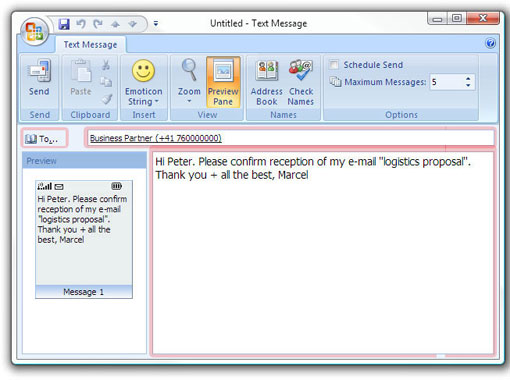
 Adrian was pretty much surprised when he found out thatOutlook Mobile Service with ASPSMS.COM had allcontacts from his Nokias address book stored in a specialMobile Address Book.



| Factsheets | |
|---|---|
| Purpose and business examples | |
| SMS tools for End Users | |
|---|---|
| Name | Pricing |
| SMS Blaster Winlog | free |
| Microsoft Office Outlook 2013-2016: Email to SMS | free |
| Microsoft Office Outlook 2010 Mobile Service | free |
| Microsoft Office Outlook 2007 Mobile Service | free |
| SMSBLASTER web edition | free |
| SMS Blaster Windows Edition | free |
| SMS touch for iPhone and iPod touch | Shareware |
| ECO-SMS - Ökologische SMS! | Shareware |
| Cybersystems mscrmSMS | see price list for details |
| Jabber-Client Chatopus for Palm OS | small one-time payment |
| delight Software GmbH | see price list for details |
| ASPSMS Widget for Mac | free |
| SMS scripts and interfaces for developers | |
|---|---|
| Name | Pricing |
| ASPSMS Dot Net Assembly on NuGet | free |
| ASPSMS JSON API (REST) | free |
| C# Microsoft ASP.NET Identity MVC (for SOAP) | free |
| Node.js interface for ASPSMS | free |
| PHP Class for ASPSMS SOAP web service | free |
| aspsms.dll (Active-X) | free |
| SOAP Web Service | free |
| XML-Interface | free |
| ASPSMS SMTP Interface | free |
| VBscript Class (ASP) | free |
| HTTP | free |
| PHP - Python - C# - Java | free |
| Jabber to SMS for Server Admins | free (open source) |
| SMS Blaster Visual Basic Source Code | free |
| ASPTOKEN | free |
| Network coverage | |
|---|---|
| Supported networks around the world |
Latest News
Switzerland
Supported operators in your country:
Aldi
CoopMobile
Digitec Connect
FL1
Lebara
Lidl Connect
Lycamobile
M-Budget
Mucho
Netplus
OK Mobile
Quickline
Salt
Sunrise Mobile
Swisscom Mobile
Talktalk
UPC
Wingo
Yallo


